


Look, we’ve run hundreds of auctions, build three separate auction software platforms and took thousands of photos of items. We’ve seen it all: the electrifying energy of a bidding war that drives prices through the roof, and the absolute technological despair of a server crashing with two minutes left on the clock.
We know that running an auction company isn’t just about fast talking or shiny inventory. It’s about logistics, managing chaos, and, ultimately, squeezing every last dollar out of the assets on the block.
In 2026, your gavel is digital. Your auction software isn’t just a website; it is the central nervous system of your entire operation. Choose the right one, and your life gets easier while your profits soar. Choose the wrong one, and you’ll bleed cash through hidden fees and clunky interfaces that scare off bidders.
This isn’t a fluffy marketing piece. This is a no-nonsense guide born from years of experience in the trenches, designed to help you pick the right tools for the job.
What is Auction Software? (Beyond the Basics)
At its simplest level, auction software is a digital platform that lets you list items and lets people bid on them.
But if you’re serious about this business, “simple” won’t cut it. You need features and tools, but it must be simple to use. What you need is modern auction software that is a comprehensive business management tool. One that handles inventory cataloging, bidder registration/management, real-time bidding engines, simulcast, invoicing, payments, and reporting.
It replaces the clipboard, the spreadsheets, the frantic phone calls, and the manual credit card entry.
Key Benefits for Auctioneers & Liquidators
Whether you are selling heavy machinery, estate antiques, real estate, or business liquidations, the benefits of professional software are universal:
Global Reach, Local Effort: You are no longer limited to the people standing in the room (or under the tent). Your bidder pool is now “anyone with an internet connection.”
Data Ownership: Good software helps you build your database of buyers, not just borrow an audience from a third-party platform.
Efficiency: Catalog an item once on your phone, and it automatically pushes to your website, bidding platform, and marketing channels.
Choose Your Weapon: 4 Ways to Sell with great Auction Software
Understanding the difference is vital for choosing your tools. You need software that can handle the specific “flavor” of chaos you prefer.
Online-Only (Timed) Auctions: Think eBay style. Bidding opens at a set time and closes at a set time (usually days later). This is great for maximizing revenue over time and requires less “performance” pressure.
Live Simulcast Auctions: This is the hybrid model. You have a live auctioneer calling bids on the floor, but online bidders are participating in real-time against the room. This requires robust, low-latency software that won’t lag when the bidding gets hot.
Silent Auctions: The digital evolution of the charity clipboard. Instead of hovering over a piece of paper at a gala, guests bid from their phones while they mingle. It’s perfect for fundraisers and events where you want high engagement without interrupting the party with a loud auctioneer.
Buy It Now (Fixed Price): Sometimes you don’t want the drama; you just want the cash. This feature lets you list items at a set price for immediate purchase. It’s a lifesaver for clearing out “passed” inventory after an auction ends or for selling retail-ready items that don’t need a bidding war.
Top Features Your Auction Software Must Have in 2026
We’ve used software that felt like it was built in 1998, and we’ve used modern platforms. Based on our “gobs of experience,” these are the non-negotiable features you need today.
Real-Time Bidding & ``Popcorn`` Bidding (Anti-Sniping)
if your auction closes hard at 5:00 PM, you are leaving money on the table. Savvy buyers use “sniping” tools to drop a winning bid at 4:59:59, preventing a bidding war.
You absolutely need Popcorn Bidding (also called extended bidding). If a bid comes in during the final minutes, the clock automatically resets for extra seconds. This mimics the live auctioneer’s cry of “Going once, going twice…” and ensures the true market value is reached.
Mobile-First Bidding (No App Required)
Here is a hard truth: People hate downloading new apps.
If a potential bidder clicks a link to your auction on Facebook, and they are forced to download an app and create a complex account just to browse, they will leave. Your software must have a perfectly responsive mobile web interface. It should work seamlessly in Safari or Chrome on a phone.
And most importantly, it should offer the option of dropping it to your desktop using a technology called PWA.
Automated Invoicing & Payments
The auction high wears off quickly when you are stuck in the office at midnight manually sending 300 invoices and chasing failed credit card payments.
Your software must allow link to pay with standard processors like PayPal, Venmo, and Cash App. When the hammer falls, the winner should get an invoice and be able to pay immediately. Automated, professional invoices, sent automatically, is essential. The goal is less work for accounts receivable.
CRM Integration (Why it matters for follow-up)
The gold is in the follow-up. If someone bid on a vintage Rolex but lost, you need to know who they are so you can alert them when the next watch comes across. Your software needs a built-in Customer Relationship Management (CRM) system or easy integration with external ones. Don’t let valuable bidder data die in a siloed spreadsheet.
Additionally, customer management allows you to block bad actors, encourage loyal, customers, and print things like bitter badges and reports. If your auction software doesn’t have a robust auction CRM, you will struggle to grow your buyer vase and worse yet you may have to buy separate CRM software, which increases your overall expense.
10 Other Critical Features You Shouldn't Compromise On
Don’t settle for bare-bones software. To run a truly professional operation, your checklist should also include:
- Condition Reports (for high value items, customize from simple to complex)
SEO-Optimized Auction Catalogs (your site gets found)
Consignor Checks (payouts made easy)
White-Labeling (your logo, colors, and URL—not the software’s)
Bulk Image Uploads (add unlimited photos from your phone or pc)
Real-Time Reporting Dashboards
Clerking Consoles (for managing live events)
- Every Auction Style (Live, online, simulcast, buy now, etc)
- Custom fields (run any auction business without pigeonholing the message to comply with your software)
- Unlimited Users, Listings, Photos, Items (growing should not cost more)
Auction Software Pricing Models: The Hidden Costs
This is where most auctioneers get taken for a ride. We’ve seen contracts that look cheap upfront but end up costing tens of thousands of dollars a year.
Commission-Based Pricing (The ``Success Tax``)
Many popular platforms charge a percentage of your total sales (often 1% to 5%).
Sounds easy, right? No upfront cost, easy startup!
But think about it: You do the work to source the consignment. You take the photos. You market the event. You build the bidder pool. Why should the software company take a bigger slice of the pie just because you successfully sold a high-value item?
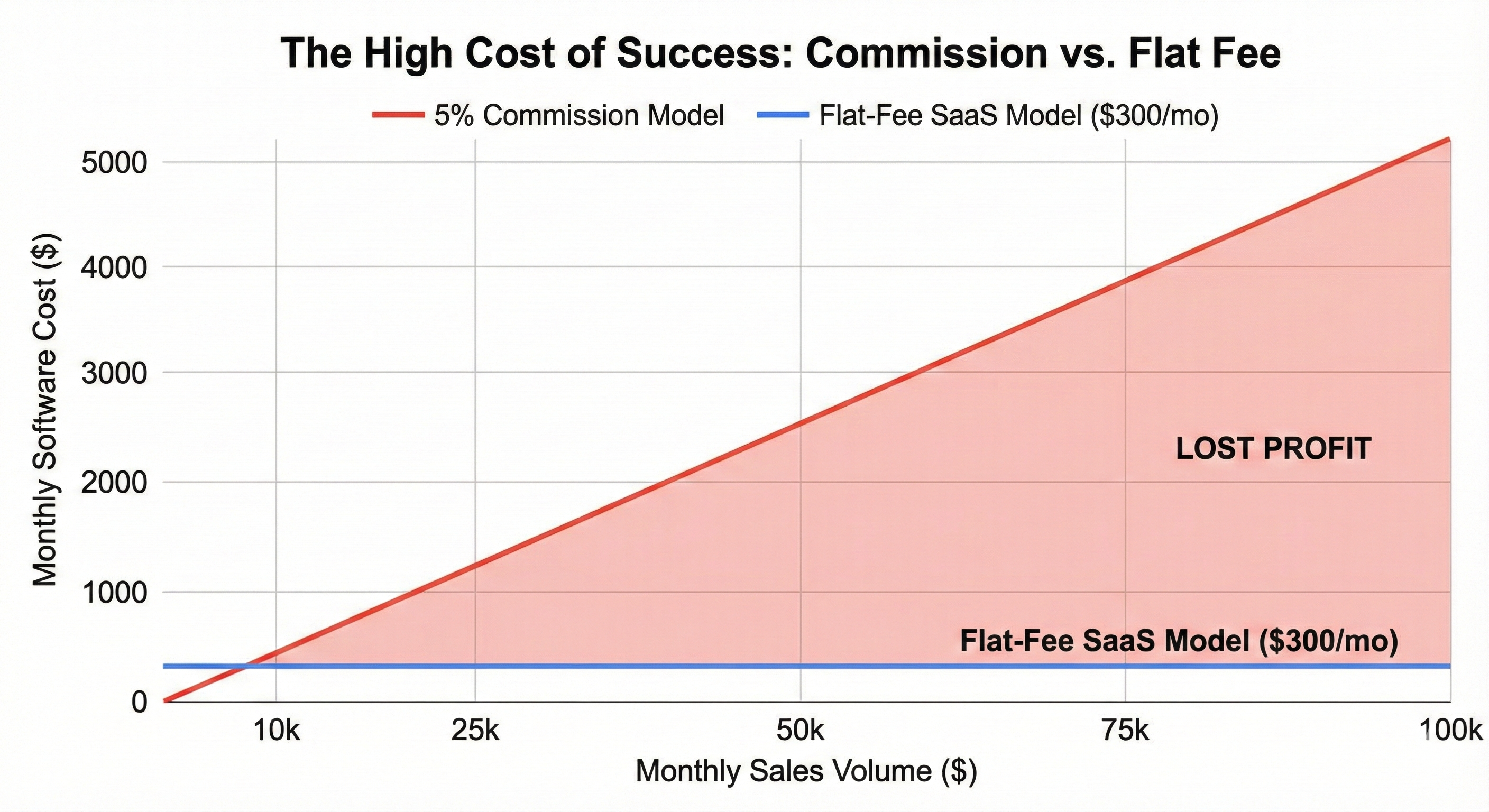
If you sell $100,000 of inventory in a month, a 3% fee means you just paid $3,000 for software that month. That’s a massive “success tax.”
Monthly vs Legacy Auction Software Pricing
Flat-Fee Subscription Models (The Sanity Option)
This is the model experienced business owners prefer. You pay a set monthly or annual fee for the software, regardless of how much you sell.
Whether you sell $10k or $1M, your software cost remains predictable. This model aligns the software company’s incentives with yours—they need to provide a stable, feature-rich platform to keep your subscription, rather than just skimming off your top-line revenue.
This is how Selling Lane Auction Software operates, see pricing
Understanding the 4 Types of Fees
Do not confuse these. Knowing the difference can save you thousands.
Transaction Fees (Processing Fees): This is what Visa/Mastercard/Stripe charge (usually around 2.9% + $0.30). You cannot avoid this if you accept credit cards.
Platform Fees: This is the extra percentage the software company tacks on top for themselves. This is avoidable.
Buyer Fee: This is the extra percentage the software company tacks on to the buyer’s bill when they win an item. This is avoidable, or you could charge it yourself and keep the buyer fee as profit.
Fee per Seat: This is a fee that some software companies charge for each user. This is avoidable if you purchase SaaS software, where you are just charged one monthly fee no matter how many employees you have using the software.
Top Auction Software Platforms Compared
1. The Generalist, Flat-Fee Option (e.g., Selling Lane)
These platforms are built for independent auction companies that want powerful features without revenue sharing. They handle everything from estates to heavy equipment, including Simulcast, Timed, and Buy It Now options.
Pros: Predictable pricing (no success tax), robust CRM features, you own your data, great for building your own brand authority.
Cons: You are responsible for driving your own traffic (white label, with some buyer sharing).
2. The Charity/Gala Specialists (e.g., Handbid, GiveSmart)
These are fantastic if you are running a silent auction for a school fundraiser while people drink wine and eat rubber chicken.
Pros: Slick mobile interfaces, features for selling tickets and donations.
Cons: Often very expensive for commercial use, and the features don’t translate well to high-volume asset liquidation.
Note: Software such as Selling Lane and others will include features found in this category without the per-transaction fee
3. The Mega-Marketplaces (e.g., Proxibid, LiveAuctioneers)
These are the giants. You list on their platform alongside thousands of other auctioneers.
Pros: Instant access to registered bidders. Great for very niche, high-value items that need national visibility.
Cons: Extremely expensive percentage-based fees. You don’t own the customer relationship; the platform does. You are competing for attention against every other auctioneer on the site.
How to Launch Your First Online Auction
Cataloging is King: Take high-quality photos. Write honest, detailed descriptions. Point out the flaws—it builds trust. Good software lets you do this quickly from a mobile device.
Set the Rules: Define your Terms & Conditions clearly. What is the buyer’s premium? What are the pickup times? Is shipping available? No surprises.
Market the URL: Don’t just post “Auction on Friday!” Share the direct link to specific, interesting items on Facebook, Instagram, and your email list. Drive traffic directly to the bidding pages.
Manage the Close: Be available during the final hour of the auction to answer last-minute bidder questions. Watch the popcorn bidding work its magic.
Conclusion: Which Platform is Right for You?
If you are running a one-off charity event, choose a charity specialist.
If you are selling extremely rare, niche collectibles to a global audience and don’t mind paying high fees for access to buyers, consider the mega-marketplaces.
But, if you are a professional auction company, liquidator, or estate seller looking to build a sustainable business, control your own data, and keep more of your hard-earned profit, you need a robust, flat-fee platform. Don’t pay a “success tax” on your own hard work.
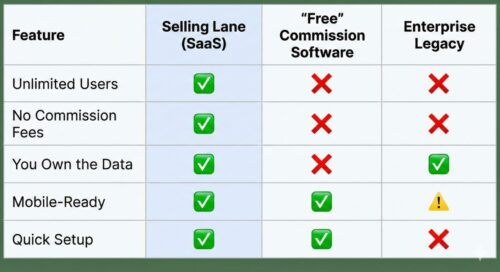
Frequently Asked Questions (FAQ) About Auction Software
What is the best auction software for small businesses? Small businesses should prioritize platforms with flat monthly fees rather than revenue-share models. When you are growing, you need predictable costs. Avoid software that takes a percentage of your sales, as this penalizes your growth. Look for an all-in-one solution that handles cataloging, bidding, and invoicing to keep your administrative overhead low.
How much does auction software cost? It varies wildly. Some platforms claim to be “free” but charge high percentages (3%-7%) of every sale you make. Others charge significant setup fees ($1,000+). The most transparent model for businesses is a flat monthly subscription, which generally ranges from $100 to $500 per month depending on features and usage, regardless of your sales volume.
Can I run an online auction without requiring buyers to download an app? Yes, and you should. Modern auction software utilizes “responsive web design.” This means the auction website automatically adjusts to look and function perfectly on a smartphone’s web browser (like Safari or Chrome). Removing the barrier of downloading an app significantly increases bidder participation.
How do I prevent “bid sniping” in an online auction? Bid sniping occurs when a buyer waits until the very last second to place a bid, preventing others from responding. The solution is using software equipped with “Popcorn Bidding” (also known as extended bidding or dynamic ending). This feature automatically extends the auction clock (usually by 1-3 minutes) whenever a bid is placed near the end, ensuring every bidder has a fair chance to counter.
What is the difference between a silent auction and a live auction? A silent auction (or timed online auction) is typically run over several days. Bidders place bids digitally, and whoever has the highest bid when the pre-set timer runs out wins. A live auction involves an auctioneer (in-person or streamed video) calling out bids in real-time, creating urgency and immediate competition until the hammer falls.